Wednesday, December 14, 2016

Tuesday, November 22, 2016
Sangam 16
AIOUG & My Journey to Sangam16
I have been associated with All India Oracle User Group for more than a year now. Started the association with presenting a basic topic and gradually leading up the Bangalore Team of AIOUG.
It's always nice to share Knowledge and this group has got really nice folks who are eager to just share all that they know.
This was my first Sangam event, was not sure of how this event would go but the 3 days of it was one of the best 3 days of this year. What a good note to end the year.
Online & Offline efforts to promote the event. Sent almost 6600 emails, 130 phone calls, don't care how many of my efforts converted into actual registrant( we got 700+ attendees).
More than learning got to meet great Technical Geeks to making new friends.
Sangam16 can be better be presented as collection of photos.


Registration Way


Saturday, November 19, 2016
ALTER table - I
ALTER TABLE tbl_Name
ALTER Column Col_Name
This is one of the expensive activity in ms-sql.
<?query --
UPDATE [vcp].[dbo].[tbl_ClaimParser_AUDIT] SET [TPA_Number] = [TPA_Number]
--?>
ALTER Column Col_Name
This is one of the expensive activity in ms-sql.
<?query --
UPDATE [vcp].[dbo].[tbl_ClaimParser_AUDIT] SET [TPA_Number] = [TPA_Number]
--?>
Friday, September 16, 2016
Change Drive location of MS Sql
USE MASTER;
GO
-- Take database in single user mode -- if you are facing errors -- This may terminate your active transactions for database
ALTER DATABASE xxDBNamexx
SET SINGLE_USER
WITH ROLLBACK IMMEDIATE;
GO
-- Detach DB
EXEC MASTER.dbo.sp_detach_db @dbname = N'TestDB' GO
Now move the files from loc1 to loc2. You can now reattach the files with new locations
GO
-- Take database in single user mode -- if you are facing errors -- This may terminate your active transactions for database
ALTER DATABASE xxDBNamexx
SET SINGLE_USER
WITH ROLLBACK IMMEDIATE;
GO
-- Detach DB
EXEC MASTER.dbo.sp_detach_db @dbname = N'TestDB' GO
Now move the files from loc1 to loc2. You can now reattach the files with new locations
-- Move MDF File from Loc1 to Loc 2-- Re-Attached DBCREATE DATABASE [TestDB] ON( FILENAME = N'F:\loc2\TestDB.mdf' ),( FILENAME = N'F:\loc2\TestDB_log.ldf' )FOR ATTACHGOTuesday, August 9, 2016
MVC
What is MVC ?
The Model-View-Controller (MVC) is an architectural pattern that separates an application into three main logical components: the model, the view, and the controller. Each of these components are built to handle specific development aspects of an application.
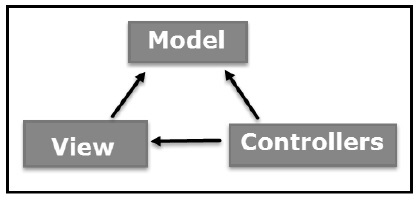
Modal - Holds all data related code, ex. get data from view or DB or business logic.
View - UI
Controller - Acts an interface between Modal and View to process all business logic
The Model-View-Controller (MVC) is an architectural pattern that separates an application into three main logical components: the model, the view, and the controller. Each of these components are built to handle specific development aspects of an application.
Modal - Holds all data related code, ex. get data from view or DB or business logic.
View - UI
Controller - Acts an interface between Modal and View to process all business logic
Sunday, July 31, 2016
ASP.Net
ASP.Net
ASP.Net Events
Events in ASP.NET raised at the client machine, and handled at the server machine.
Syntax private void EventName (object sender, EventArgs e);
Application and Session Events
Response Object
ASP.Net Events
Events in ASP.NET raised at the client machine, and handled at the server machine.
Syntax private void EventName (object sender, EventArgs e);
Application and Session Events
- Application_Start
- Application_End
- Session_Start
- Session_End
Page and Control Events
Common page and control events are:
- DataBinding - It is raised when a control binds to a data source.
- Disposed - It is raised when the page or the control is released.
- Error - It is a page event, occurs when an un-handled exception is thrown.
- Init - It is raised when the page or the control is initialized.
- Load - It is raised when the page or a control is loaded.
- PreRender - It is raised when the page or the control is to be rendered.
- Unload - It is raised when the page or control is unloaded from memory.
Event Handling Using Controls
All ASP.NET controls are implemented as classes, and they have events which are fired when a user performs a certain action on them. For example, when a user clicks a button the 'Click' event is generated. For handling events, there are in-built attributes and event handlers. Event handler is coded to respond to an event, and take appropriate action on it.
<asp:Button ID="btnCancel" runat="server" Text="Cancel" />
The event handler for the Click event:
Protected Sub btnCancel_Click(ByVal sender As Object, ByVal e As System.EventArgs) Handles btnCancel.Click
End Sub
An event can also be coded without Handles clause.
<asp:Button ID="btnCancel" runat="server" Text="Cancel" Onclick="btnCancel_Click" />
The event handler for the Click event:
Protected Sub btnCancel_Click(ByVal sender As Object, ByVal e As System.EventArgs) End Sub
Postback vs Non-Postback events
ASP.Net Server Side
Request Object
Is an instance of System.Web.HttpRequest.
It represents the values and properties of HTTP Request that makes page loading into browser.
ASP.Net Server Side
Page itself gets instantiated as control object. All web forms are instances of ASP.Net page class.
Server Object
Are instances of the System.Web.HttpServerUtility.
| Property | Description |
|---|---|
| MachineName | Name of server computer |
| ScriptTimeOut | Gets and sets the request time-out value in seconds. |
The following table provides a list of some important methods:
| Method | Description |
|---|---|
| CreateObject(String) | Creates an instance of the COM object identified by its ProgID (Programmatic ID). |
| CreateObject(Type) | Creates an instance of the COM object identified by its Type. |
| Equals(Object) | Determines whether the specified Object is equal to the current Object. |
| Execute(String) | Executes the handler for the specified virtual path in the context of the current request. |
| Execute(String, Boolean) | Executes the handler for the specified virtual path in the context of the current request and specifies whether to clear the QueryString and Form collections. |
| GetLastError | Returns the previous exception. |
| GetType | Gets the Type of the current instance. |
| HtmlEncode | Changes an ordinary string into a string with legal HTML characters. |
| HtmlDecode | Converts an Html string into an ordinary string. |
| ToString | Returns a String that represents the current Object. |
| Transfer(String) | For the current request, terminates execution of the current page and starts execution of a new page by using the specified URL path of the page. |
| UrlDecode | Converts an URL string into an ordinary string. |
| UrlEncodeToken | Works same as UrlEncode, but on a byte array that contains Base64-encoded data. |
| UrlDecodeToken | Works same as UrlDecode, but on a byte array that contains Base64-encoded data. |
| MapPath | Return the physical path that corresponds to a specified virtual file path on the server. |
| Transfer | Transfers execution to another web page in the current application. |
Is an instance of System.Web.HttpRequest.
It represents the values and properties of HTTP Request that makes page loading into browser.
| Property | Description |
|---|---|
| AcceptTypes | Gets a string array of client-supported MIME accept types. |
| ApplicationPath | Gets the ASP.NET application's virtual application root path on the server. |
| Browser | Gets or sets information about the requesting client's browser capabilities. |
| ContentEncoding | Gets or sets the character set of the entity-body. |
| ContentLength | Specifies the length, in bytes, of content sent by the client. |
| ContentType | Gets or sets the MIME content type of the incoming request. |
| Cookies | Gets a collection of cookies sent by the client. |
| FilePath | Gets the virtual path of the current request. |
| Files | Gets the collection of files uploaded by the client, in multipart MIME format. |
| Form | Gets a collection of form variables. |
| Headers | Gets a collection of HTTP headers. |
| HttpMethod | Gets the HTTP data transfer method (such as GET, POST, or HEAD) used by the client. |
| InputStream | Gets the contents of the incoming HTTP entity body. |
| IsSecureConnection | Gets a value indicating whether the HTTP connection uses secure sockets (that is, HTTPS). |
| QueryString | Gets the collection of HTTP query string variables. |
| RawUrl | Gets the raw URL of the current request. |
| RequestType | Gets or sets the HTTP data transfer method (GET or POST) used by the client. |
| ServerVariables | Gets a collection of Web server variables. |
| TotalBytes | Gets the number of bytes in the current input stream. |
| Url | Gets information about the URL of the current request. |
| UrlReferrer | Gets information about the URL of the client's previous request that is linked to the current URL. |
| UserAgent | Gets the raw user agent string of the client browser. |
| UserHostAddress | Gets the IP host address of the remote client. |
| UserHostName | Gets the DNS name of the remote client. |
| UserLanguages | Gets a sorted string array of client language preferences. |
The following table provides a list of some important methods:
| Method | Description |
|---|---|
| BinaryRead | Performs a binary read of a specified number of bytes from the current input stream. |
| Equals(Object) | Determines whether the specified object is equal to the current object. (Inherited from object.) |
| GetType | Gets the Type of the current instance. |
| MapImageCoordinates | Maps an incoming image-field form parameter to appropriate x-coordinate and y-coordinate values. |
| MapPath(String) | Maps the specified virtual path to a physical path. |
| SaveAs | Saves an HTTP request to disk. |
| ToString | Returns a String that represents the current object. |
| ValidateInput | Causes validation to occur for the collections accessed through the Cookies, Form, and QueryString properties. |
Represents server's response. It is an istance of System.Web.HttpResponse.
| Property | Description |
|---|---|
| Buffer | Gets or sets a value indicating whether to buffer the output and send it after the complete response is finished processing. |
| BufferOutput | Gets or sets a value indicating whether to buffer the output and send it after the complete page is finished processing. |
| Charset | Gets or sets the HTTP character set of the output stream. |
| ContentEncoding | Gets or sets the HTTP character set of the output stream. |
| ContentType | Gets or sets the HTTP MIME type of the output stream. |
| Cookies | Gets the response cookie collection. |
| Expires | Gets or sets the number of minutes before a page cached on a browser expires. |
| ExpiresAbsolute | Gets or sets the absolute date and time at which to remove cached information from the cache. |
| HeaderEncoding | Gets or sets an encoding object that represents the encoding for the current header output stream. |
| Headers | Gets the collection of response headers. |
| IsClientConnected | Gets a value indicating whether the client is still connected to the server. |
| Output | Enables output of text to the outgoing HTTP response stream. |
| OutputStream | Enables binary output to the outgoing HTTP content body. |
| RedirectLocation | Gets or sets the value of the Http Location header. |
| Status | Sets the status line that is returned to the client. |
| StatusCode | Gets or sets the HTTP status code of the output returned to the client. |
| StatusDescription | Gets or sets the HTTP status string of the output returned to the client. |
| SubStatusCode | Gets or sets a value qualifying the status code of the response. |
| SuppressContent | Gets or sets a value indicating whether to send HTTP content to the client. |
The following table provides a list of some important methods:
| Method | Description |
|---|---|
| AddHeader | Adds an HTTP header to the output stream. AddHeader is provided for compatibility with earlier versions of ASP. |
| AppendCookie | Infrastructure adds an HTTP cookie to the intrinsic cookie collection. |
| AppendHeader | Adds an HTTP header to the output stream. |
| AppendToLog | Adds custom log information to the InterNET Information Services (IIS) log file. |
| BinaryWrite | Writes a string of binary characters to the HTTP output stream. |
| ClearContent | Clears all content output from the buffer stream. |
| Close | Closes the socket connection to a client. |
| End | Sends all currently buffered output to the client, stops execution of the page, and raises the EndRequest event. |
| Equals(Object) | Determines whether the specified object is equal to the current object. |
| Flush | Sends all currently buffered output to the client. |
| GetType | Gets the Type of the current instance. |
| Pics | Appends a HTTP PICS-Label header to the output stream. |
| Redirect(String) | Redirects a request to a new URL and specifies the new URL. |
| Redirect(String, Boolean) | Redirects a client to a new URL. Specifies the new URL and whether execution of the current page should terminate. |
| SetCookie | Updates an existing cookie in the cookie collection. |
| ToString | Returns a String that represents the current Object. |
| TransmitFile(String) | Writes the specified file directly to an HTTP response output stream, without buffering it in memory. |
| Write(Char) | Writes a character to an HTTP response output stream. |
| Write(Object) | Writes an object to an HTTP response stream. |
| Write(String) | Writes a string to an HTTP response output stream. |
| WriteFile(String) | Writes the contents of the specified file directly to an HTTP response output stream as a file block. |
| WriteFile(String, Boolean) | Writes the contents of the specified file directly to an HTTP response output stream as a memory block. |
HTML Server Control
HTML server controls are basic html controls enhanced to enable server side processing. They are not processed by servers instead they are sent to browser for display.
They are specifically converted to server control by adding runat="server" tag and an ID attribute.
Client Side
1. Client side scripting - Code that runs on browser and are not sent to server for processing.
2. Client side code - This is code behind of aspx. Contains number of hidden field to handle view state etc.
Basic Controls
.
HTML server controls are basic html controls enhanced to enable server side processing. They are not processed by servers instead they are sent to browser for display.
They are specifically converted to server control by adding runat="server" tag and an ID attribute.
Client Side
1. Client side scripting - Code that runs on browser and are not sent to server for processing.
2. Client side code - This is code behind of aspx. Contains number of hidden field to handle view state etc.
Basic Controls
.
Friday, May 6, 2016

WCF Part 6 : WCF Hosting
WCF Hosting
- IIS Hosting
- Self Hosting
- WAS Hosting
- Windows Service Hosting
IIS Hosting
- Advantage of hosting a service in IIS
- Automatically launches the host process when it gets first client request.
- Uses features of IIS like Process Recycling, Idle shutdown, Process health monitoring, Message based activation
Disadvantage
- Only Supports HTTP Protocol
Tips : While creating service , choose Http as location in VS new project.
Self Hosting
We make a Host service, keep it running and another application as client which consumes service. It can be any application like console or win form.
Windows Activation Hosting
It is available with windows vista and above. It is available with IIS7.0 and supports Http, TCP and named Pipes.
Hosting WCF in Activation service takes many advantages such as process recycling, isolation, idle time management and common configuration system. WAS hosted service can be created using following steps Enable WCF for non-http protocols Create WAS hosted service Enable different binding to the hosted service
Wednesday, May 4, 2016
WCF Part 5 - Architecture
Architecture

Contracts
Contracts layer are next to that of Application layer. Developer will directly use this contract to develop the service.
Service contracts
Describes about the operation that service can provide.
Example, Service provided to know the temperature of the city . It will be created using Service and Operational Contract attribute.
Data contract
It describes the custom data type which is exposed to the client. This defines the data types, are passed to and from service.
Message Contract
Default SOAP message format is provided by the WCF runtime for communication between Client and service. If it is not meeting your requirements then we can create our own message format. This can be achieved by using Message Contract attribute.
Policies and Binding
Specify conditions required to communicate with a service e.g security requirement to communicate with service, protocol and encoding used for binding.
Service Run-time
- It contains the behaviors that occur during runtime of service.
- Throttling Behavior- Controls how many messages are processed.
- Error Behavior - Specifies what occurs, when internal error occurs on the service.
- Metadata Behavior - Tells how and whether metadata is available to outside world.
- Instance Behavior - Specifies how many instance of the service has to be created while running.
- Transaction Behavior - Enables the rollback of transacted operations if a failure occurs.
- Dispatch Behavior - Controls how a message is processed by the WCF Infrastructure.
Messaging
- Messaging layer is composed of channels. A channel is a component that processes a message in some way, for example, by authenticating a message. A set of channels is also known as a channel stack. Channels are the core abstraction for sending message to and receiving message from an Endpoint. Broadly we can categories channels as
- Transport ChannelsHandles sending and receiving message from network. Protocols like HTTP, TCP, name pipes and MSMQ.
- Protocol ChannelsImplements SOAP based protocol by processing and possibly modifying message. E.g. WS-Security and WS-Reliability.
Activation and Hosting
- Services can be hosted or executed, so that it will be available to everyone accessing from the client. WCF service can be hosted by following mechanism
- IISInternet information Service provides number of advantages if a Service uses Http as protocol. It does not require Host code to activate the service, it automatically activates service code.
- Windows Activation Service(WAS) is the new process activation mechanism that ships with IIS 7.0. In addition to HTTP based communication, WCF can also use WAS to provide message-based activation over other protocols, such as TCP and named pipes.
- Self-HostingWCF service can be self hosted as console application, Win Forms or WPF application with graphical UI.
- Windows ServiceWCF can also be hosted as a Windows Service, so that it is under control of the Service Control Manager (SCM).
Subscribe to:
Comments (Atom)